
SharPoint 2013 type of Apps
- SharePoint Hosted App
- Cloud Hosted App
SharePoint Hosted App: There are two types of Apps that you will be created depending upon the type of solution you need. The first type called “SharePoint Hosted”. Apps that include only SharePoint components and that are installed on the customer's own SharePoint Online tenancy or its own on-premises SharePoint farm. SharePoint-hosted apps for SharePoint are installed on a SharePoint 2013 website, called the host web, and that have their resources hosted on an isolated subsite of a host web, called the app web.
- The client side resources such as webpage client side JavaScript code which are served by the SharePoint Host.
- This type of application you can create using either using the “Napa” online App or another option you have Visual studio 2013 template which fully support the App model. With Napa you unable to creates the SharePoint other elements such as content type, list instance etc.
- This type of solution doesn't contain any type of external web site.
- This type of solution you can only work on the SharePoint list and Web Parts.
- By using this type of model you can use the SharePoint REST API or JavaScript CSOM API to perform the list operations.
- The visual studio 2013 in case of SharePoint hosted doesn't create the external application web application. Also if you check the .App solution file and rename to .zip. You will not fund any .wsp file ;Its mean this app is SharePoint Hosted app.
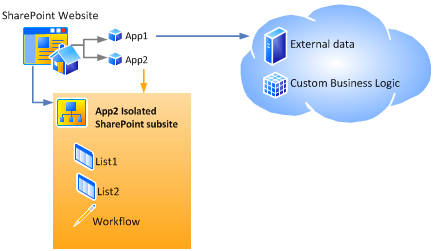
Cloud Hosted App: Second type of SharePoint App in which you write the server side code in any language Eg. C#, JAVA, Python, Ruby & Rail etc. This type of SharePoint App required its Own External website. The Code execute outside the SharePoint Farm & Even outside the SharePoint environment. In SharePoint 2013 this type of app that has its own external website is known as Cloud-hosted app.
- This approach enables you to use any programming languages that you wish.
- The provider-hosted app for SharePoint interacts with a SharePoint 2013 site but also uses resources and services that reside on the remote site.
- This approach enables you to use any hosting service you want.
- This approach enables you to use JavaScript or the SharePoint REST/OData web service.
- This approach enables you to interact with a SharePoint 2013 site by using one of the SharePoint client object models or its REST/OData-based web service, and to use the OAuth protocol for app authentication and authorization.
Visual Studio 2012
template for SharePoint Hosted App; What inside its App File?

- Inside the SharePoint Hosted App: Visual Studio 2013 SharePoint Hosted App located at the following location: <Project>\<AppProject>\bin\Debug\app.publish\1.0.0.0\*.app .

- When you change the extension of this file .app to .zip and extract it you will find the app file contains the following files. The AppManifest.xml contains the basic setting.

- You will see the above WSP file that reside the SharePoint app. SharePoint Hosted App you will not fund any dll inside the WSP file because as mentioned above SharePoint hosted app doesn't contains any dll only client side code can be added to this file.

Cloud hosted App: You will find the cloud hosted app at location:
<Project>\<AppProject>\bin\Debug\app.publish\1.0.0.0. So cloud hosted app contains the external website that reside inside the .zip fine inside the app package. When you creates the cloud app by choose other then SharePoint Hosted app ie (AutoHosted or Provider hosted) both option creates same type of solution below is the extracted .App file. You will find the <ProjectName>Web.zip (naming convention) zip file. That contains the external website.
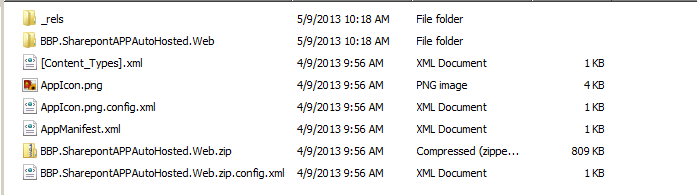
SharePoint Cloud hosted App contains two projects SharePoint App that contains SharePoint components and also contains the Other App solution package file. The other solution contains the Web related resources you can add any type of web resource. See the example

Developer can write the code by combination of Two Options . First, you must decide whether to use client-side code or server-side code. Second, you must decide between CSOM and the REST API. Client-side JavaScript that uses CSOM
- Client-side JavaScript that uses CSOM
- Client-side JavaScript that uses the REST API
- Server-side C# code that uses CSOM
- Server-side C# code that uses the REST API
Cloud Hosted App can be creating either by visual Studio 2013 template by choose the "Provider-Hosted" or "AutoHosted" option.
APP Book
Microsoft SharePoint 2013 App Development
APP Book
Microsoft SharePoint 2013 App Development
Comments
Post a Comment