
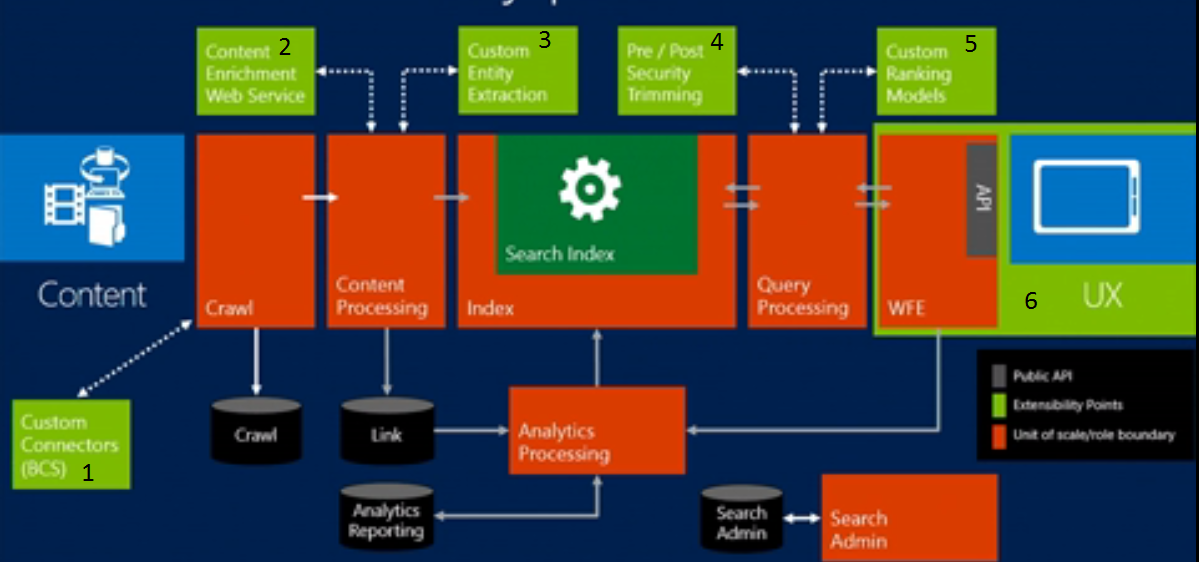
SharePoint 2013 buzz word "Search 2013 Extensibility" related to
the Search prospective. In SharePoint 2013 following are the points where we
can customize the search experience.
- BCS Connector
- Content enrichment web service
- Custom entity extraction
- Pre/post security trimming
- Custom Ranking Models
- User Experience (UX)
- BCS Connector: SharePoint 2013 there are some of the new method added in the BCS entity connector framework that works well and more stable for large items. Crawl data from the external system you can use the BCS connector and crawl the data into your SharePoint 2013. Please refer the below link that refer the BDC Mode properties and method that need to incorporate in your BDC file.
- SharePoint BCS Connector and its method that required for crawl
- No Code
- OData
- SQL
- Code
- .Net Assembly
- WCF
- BCS Request Methods
- Full Crawl
- Finder(): Return All Docuemnt
- SpecificFiner(Id1): Return the properties to the single Item.
- StreamAccessor(Id1) (Optional): Only way to get the data like attachments like word document and excel document & you wanted to parse the data into text. So you need to use this method.
- Incremental Crawl following two methods used instead of finder
- ChangedIdEnumerator
- DeletedIdEnumerator
http://msdn.microsoft.com/en-us/library/gg294165.aspx#SearchBDCModelProperties_Performance
- Content Enrichment Web Service: Content Enrichment web service is called during the content processing. So any crawl properties during content processing you want to change it. You can use the content enrichment web service.
- Custom Entity extraction: SharePoint Server 2013 administrators can create and deploy custom entity extraction dictionaries to configure the search system to look for specific words or phrases (entities) in unstructured content. The extracted entities are stored in separate managed properties, and you can use them to improve your organization’s search experience.
- Determine which type of custom entity extraction dictionary you want to create: Word, Word Part, Word exact or Word Part exact
- Create dictionary
- Deploy dictionary
- Configure manage property
- Add one or more content sources and run a full crawl
- Configure a search results page
- Pre/post security trimming: In share point 2010 we have post security trimming but in SharePoint 2013 we have called the per security trimming the idea behind was that when the request comes from the query processing pipeline we can add the some security then during this stage we add the claims to pre-security trimming stage.
- Pre security trimming
- Post security trimming
- Custom ranking model: you can create your own custom rank model to change the result relevancy. Before creating your own custom ranking model you need to take care it would effects the relevancy so the result would be a different. Generally recommend you don’t do. It messes up the relevancy. By default there are 16 OOB ranking model.
- http://msdn.microsoft.com/en-us/library/office/dn169052.aspx
- http://technet.microsoft.com/en-us/library/dn169065.aspx
- User Experience (UX): Display template (html & JavaScript) has the following template associate with it.
- Control template
- Item template
- Also filter, groups and hover cards
- How create your own custom display template? Use the following workflow
- Copy the existing templat
- Choose the editor you want to work on it
- Identify the manage properties and add to the templat
- Develop your own Design template that include the new html and JavaScript (Jquery
- Save it to the master gallery.
- http://sharepointfordeveloper.blogspot.in/2013/09/sharepoint-2013-result-types.html
- http://sharepointfordeveloper.blogspot.in/2013/09/sharepoint-2013-result-source.html
Comments
Post a Comment